

 Brian Morris
 Taylor Dove
Adaptive gaming controllers offer unique features that allow people with disabilities to enjoy video games on just about any platform, from PlayStation and Xbox consoles to Nintendo and PC systems. Here are 12 adaptive gaming controller options to consider – plus resources to help you find the best adaptive gaming controllers for you (or your loved ones).
1. Stickless
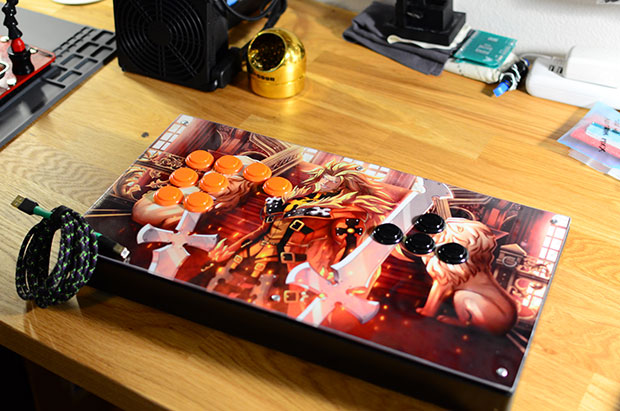
Buttons replace joystick at Stickless, which makes custom video game controllers for people who struggle to use standard controllers. The company’s founder developed the first Stickless controller for a friend who was facing hand problems. Now, the company makes two controllers – the Stickless GC and the Stickless Arcade – that feature customized button layouts to accommodate disabled people.
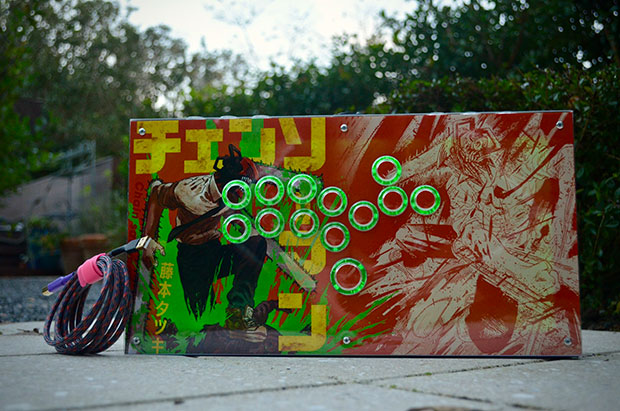
Customization options don’t stop there – you can also choose your controller’s color, graphics and the type of wood used in its construction. Stickless controllers are compatible with the PS4, PS3, Xbox One, Xbox 360, Wii U, Nintendo Switch and PCs.
Each Stickless controller is handcrafted exclusively for each gamer, and pricing starts at $225 for the Stickless GC and $280 for the Stickless Arcade.
Want easier TV control?
Check out our post on the best TV remotes for people with disabilities.
2. Evil Controllers
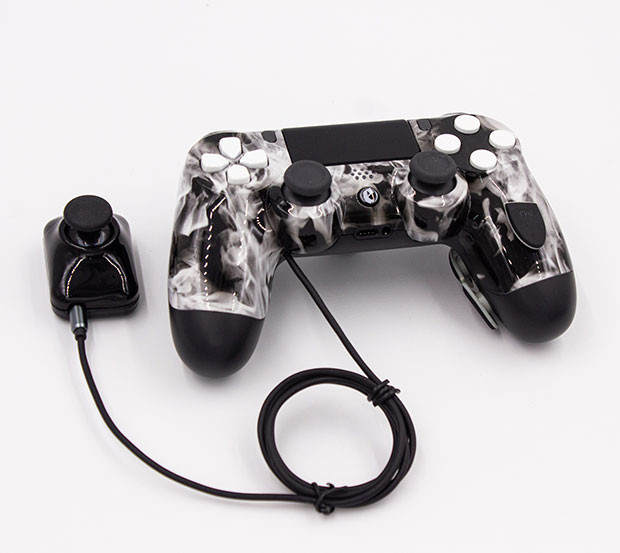
Popular among serious gamers for its modded controllers and custom graphics, Evil is also committed to accessible gaming for disabled players. The company doesn’t manufacture a line of pre-made controllers; instead, it works with each customer individually to design a controller that suits their needs.
The process begins with an email or phone consultation in which Evil will learn more about your gaming state and how they can improve your gaming experience. You can share photos and videos to help them better understand your disability and what you need out of an accessible gaming controller.
After your consultation, Evil will create a prototype; then, they’ll work with you to tweak your controller until it meets your needs.
3. Microsoft Xbox Adaptive Controller
Perhaps the best-known of all adaptive gaming controllers, Microsoft developed the Xbox Adaptive Controller for gamers with limited mobility.
The tech giant partnered with experts from The Cerebral Palsy Foundation, The AbleGamers Charity, Warfighter Engaged and SpecialEffect to build a device that’s much more than a simplified controller.
The base controller features oversized A/B buttons and directional pad, but the Xbox Adaptive Controller’s real power is in its expandability: it connects to external buttons, switches, mounts, joysticks (including foot pedals and the QuadStick for quadriplegics) and other devices via USB ports and 3.5mm jacks to extend the controller’s functionality and foster accessibility for gamers with many types of disabilities.
All buttons can be remapped via the Xbox Accessories app to support your preferred functionality, and you can save multiple gamer profiles so each can play according to their preferences.
Put it all together, and the Xbox Adaptive Controller is an excellent option for gamers – especially given its $100 price point. The best part? It works with all Xbox consoles and Windows 10 PCs, so it enables gamers to enjoy the entire Xbox game library plus Window 10 PC games.
4. Quadstick
The Quadstick is a mouth-operated controller designed to enable quadriplegics to play video games at a high level and to participate as equals in social gaming communities. It was developed by Fred Davison, who sought to carry on Ken Yankelevitz’s work on mouth-operated video game controllers, and initially funded via a crowdsourced Kickstarter campaign.
Three versions are available: the FPS, which features a joystick, four sip/puff pressor sensors and a lip position sensor; the Original, which offers the same features as the FPS but with a lower-cost joystick gimbal; and the Singleton, which is a simpler version designed those who wish to operate a computer but not play video games.
Mappable controls make it easy to customize the gaming experience, and users can remap inputs and outputs quickly during gameplay.
The Quadstick works directly with the PlayStation 4 and PlayStation 3 and Nintendo Switch as well as Windows and Mac computers. Add a converter, and it’s also compatible with the PS5, Xbox One and Xbox 360.
Bicycles for Children with Disabilities
Step away from the screen and into the outdoors with these bikes for children with disabilities.
That means the Quadstick empowers quadriplegics to play just about any title on all popular consoles in the gaming universe.
“The best way to see what it can do is watch some of the streamers, like RockyNoHands or Steamy Biscuit. Search YouTube for ‘Quadstick’ and their videos will pop up,” says Davison. “Rocky is now making a living streaming for an E-sports team. Steamy spends a lot of time helping others use the Quadstick.”
Davison says the Singleton Quadstick can plug directly into the Xbox Accessible Controller, but “most people use it with ‘copilot’ since the XAC USB joystick support is limited compared to just running the two in parallel. Pitbull Reese uses both an XAC and Quadstick.”
Accessories such as mounting arms and adapter kits are also available to further customize the gaming experience. Check out Quadstick tutorials to learn more about what it can do.
The Quadstick FPS costs around $550, the Singleton around $450 and the Original around $400.
5. QuadJoy 3
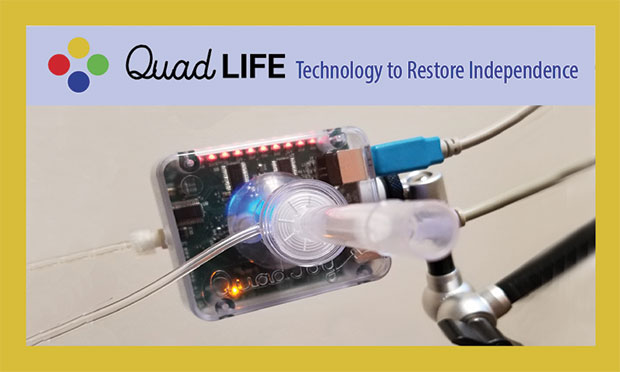
The QuadJoy 3 by QuadLife is a mouth-operated joystick that replaces computer mouses. It was designed to integrate into everyday life for those who are paralyzed or have disabled hand movement. Users include those who are newly engineered, those who work on computers, hospital patients – and gamers.
The QuadJoy 3 employs sip/puff technology in combination with the joystick so gaming enthusiasts can play games on their favorite platforms, including Windows 10 PCs, Xbox consoles, Android and iOS devices.
“We made the QuadJoy 3 mimic an 8-button joystick that works with the Xbox system,” says QuadLife cofounder Bill Street. “It plugs into either a Windows 10 computer or, for more flexibility, it plugs into the Xbox Adaptive Controller where you can change the button commands into game functions. Currently, the USB port on the QuadJoy is what connects to the XAC, but soon we hope to have the joystick function work with an auxiliary USB port so that the user can switch between their personal computer and Xbox without help.”
The QuadJoy 3 can also be switched from a USB connection to up to 4 Bluetooth connections, and a Smart TV mode can be programmed to output keyboard characters.
“Because the QuadJoy is self-contained and outputs standard HID, it will run any program on any operating system,” says Street.
The QuadJoy 3 Kit starts at $1,345 and comes with the QuadLife 3 joystick, flexible mounting arm and clamp. The “8-button” joystick option is available for an additional $100, though Street says QuadLife will offer it free to U.S. veterans, veteran hospitals and rehabilitation facilities that have the QuadJoy system.
6. VoiceAttack
VoiceAttack isn’t a physical controller; instead, it’s Windows software designed to enhance gaming with customizable voice commands. That makes it an option for gamers who have mobility issues.
VoiceAttack can be used alone or alongside gaming devices. For example, someone who is paralyzed might use an eye-tracking mouse to move their character and voice commands to make their character jump or fire a weapon. It works with Windows and Steam games.
The software is highly configurable with unlimited commands and allows you to set unique profiles for every different game, character and application. There might be a bit of a learning curve, but VoiceAttack boasts an active community that’s willing to help you achieve just about any configuration (check out this story about how VoiceAttack was used to help a disabled person play games, answer phone calls and even open his refrigerator).
VoiceAttack is only $10, so it’s an affordable option that’s worth investigating before you commit to more expensive options.
MP3 Players for People with Disabilities
Who doesn’t love music? But for some people, operating mainstream MP3 players can prove difficult. Check out these simple MP3 players for people with disabilities.
7. Single-Handed Xbox Controllers
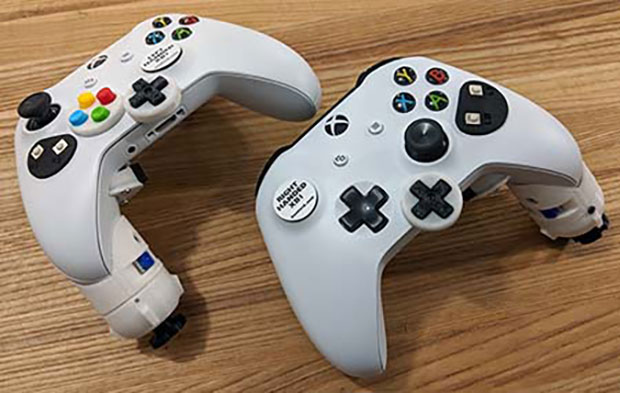
There are now single-handed controllers available for the Xbox, with special features such as a lowered analog stick that doubles as a handle. The controller also features an ergonomic secondary analog trigger as well as Bluetooth compatibility.
The controller has all controls moved to one side, so individuals with one hand can access every button and trigger they need to play the game.
These custom-made controllers cost $350 and are made in both right-handed and left-handed versions (PS: they also offer single-handed PlayStation controllers!).
8. Inclusive Inc. Controllers
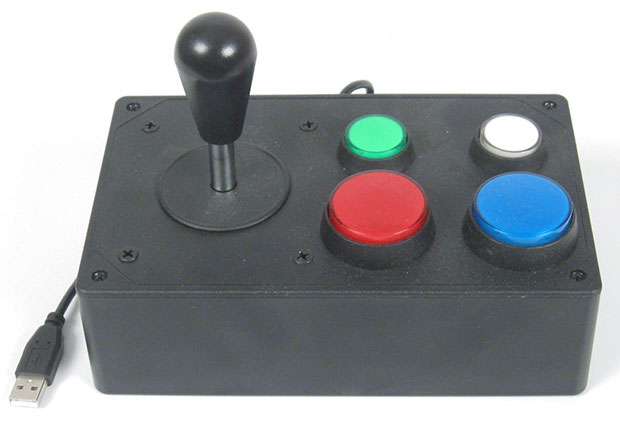
Inclusive Inc. Controllers offers a wide variety of adaptive gaming controllers and replacement parts, allowing gamers to customize their experience.
The company currently offers controllers for PlayStation, Xbox and Wii consoles, as well as Microsoft adaptive controller joysticks, ability switches and mounts. One of the more unique controllers offered is a modified guitar to use for games such as Rock Band and Guitar Hero.
Controllers start at $149, with more customization options available to meet every gamer’s needs.
9. RJ Cooper & Associates Controllers
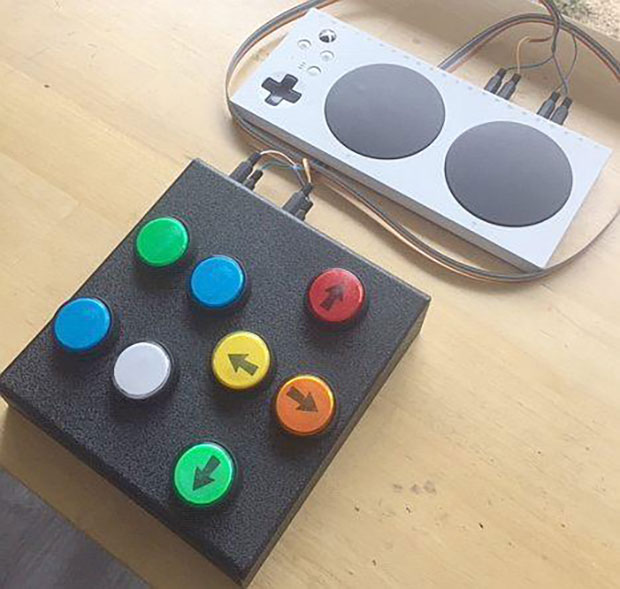
RJ Cooper & Associates offer both entertainment controllers as well as adaptive gaming controllers, including the Xbox One/S/X and PS4/PS5 controllers depicted above.
Their controllers feature a variety of accessible button and joystick combinations to cater to a variety of users. In addition to gaming controllers, they also offer accessible tv remotes and DVD players.
Pricing starts at around $179, which makes RJ Cooper & Associates adaptive controllers relatively low-cost alternatives to some other options.
10. Jouse+
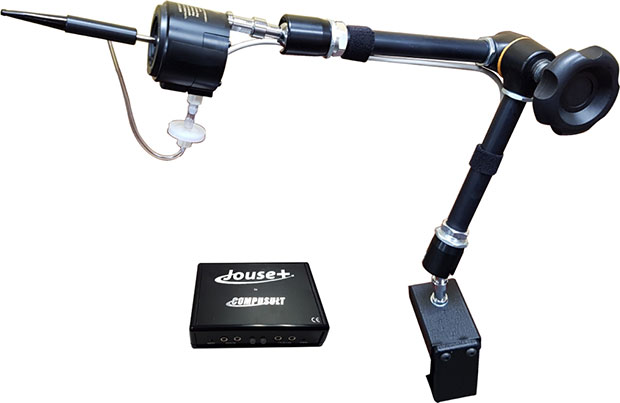
The Jouse+ is an alternative controller to use with computers and mobile devices. This mouth-controlled USB joystick features plug-and-play technology with a high-quality articulated arm and desk mount.
This controller can be controlled with the mouth, cheek, chin, or tongue, making it a good option for those with impaired movement in their arms and legs. The Jouse+ supports Windows, Mac, Linux and Unix-based computers, as well as Android and Apple devices.
With a variety of mounting options, the Jouse+ can also be equipped with additional equipment such as microphones, switches, and webcams.
11. Bluetip Gaming Controller
Bluetip Gaming is one of the premiere adaptive gaming controller companies in the country. The company is active in the accessible gaming community and offers multiple gaming controllers that cater to every gamer’s needs.
Bluetip Gaming sells the Axis 1, 2, 4 and 6 Pro controllers, each retailing for anywhere from $499 to $599. These controllers are all compatible with Xbox360, XboxOne, Playstation 3 and Playstation 4 consoles, as well as PC. Each model features a unique ergonomic layout so every gamer can find an option that suits their needs.
12. OneSwitch
OneSwitch offers a variety of adaptive gaming controllers to meet all your gaming needs. Their offerings include Switch-accessible, one-handed, and tailor-made controllers. You can also find large controllers and accessories such as adapters and mounts.
The solutions offered by OneSwitch cover a variety of gaming consoles as well as PCs, making video games more accessible for everyone.
The price range for OneSwitch products varies greatly on the type of adaptive controller you’re looking for, and the specific console you use. However, OneSwitch offers something for every gamer.
More Help
For more help with finding accessible video game controllers, check out these resources.
SpecialEffect
SpecialEffect is a UK-based company that aims to bring the fun of video gaming to those with physical disabilities. They work to create personalized gaming options for each of their clients, and share their accessibility knowledge with others to improve the gaming experience for everyone.
Able Gamers
Able Gamers work to address the loneliness and isolation within people with disabilities by connecting them with others through video games. They’ve provided counselling and technological assistance to over 3,500 people with disabilities, bringing them into the gaming world.
The company has also worked alongside Xbox, PlayStation, Blizzard and more to further accessibility within video gaming.
Do you know about any adaptive gaming controllers we haven’t included? Contact us to let us know!



 LifeZest
 Chris Karl






You have created gaming technology for people with physical disabilities. Do you have gaming technology for adults who have learning disabilities
I have a patient that is disabled and has a very hard time with the controller for his Playstation 5, his hand don’t have a lot of strength and he finds its to hard to push the buttons, is there anything available for him?
Hello Teresa,
I make an adaptive controller for the PS5 specifically designed for individuals with limited hand function/strength: https://www.kfkdesigns.com/product/quad-gamer-ps5-/1?cs=true&cst=custom
My brother has been diagnosed with ALS. In the last 6 months has lost function of both arms. He loves PlayStation .
Please help me. He is now confined to a lift chair. Depressed and missing PlayStation.
Can you help me make him smile a little.
Thank you
Suzanne
Hi. did you find any answer.? i am at the same spot as your brother. I want resume gaming so hard. Please let me know. thank. MaxyMass
Would love to talk with someone who could recommend the right controller for me. One of the ways my son and I would connect when he was at his moms was through playing FIFA online, since my accident that no longer happens. You lose so many things as a quadriplegic, even the smallest tasks are difficult, it would be great to have just a little bit of normalcy.
Yes I have an idea that will allow people with use of only one hand or have much better reaction times when playing vs other controllers & to be able to play more effectively than anything I’ve seen. Please contact me
I would be interested in this for my son who has CP
I am trying to find a controller that is wider than the standard PS5 controller. I like the shape and button layout. I just need a unit that is wider
Glydr is prepping to launch our unique foot controller via Kickstarter very soon. This radically different device enables gamers to use their feet to assist in gaming. We believe it will be useful to everyone who has the use of their feet – not just those with limitations on the use of hand controllers, keyboards, and mice. We’d love to hear from anyone who has an interest.
I’m embarrassed to comment here since my problem is so minor, but I have a hard time in shooter games that require spot on aim for shooting because of shaking in my hand. Is there a controller with a joystick that compensates for that? Some games have incorporated “aim assist” settings,
I have an grandson with no motor skills or communication. he fails and throws everything like a 12 month old baby. is there any game system that uses a cap and hand gloves with sensors? dor very simple games like pin the tail on the donkey or like a childs driving game
that fails word on my questions suppose to be flails
I have a very severe case of Rheumatoid Arthritis in my hands. I play on iPad and I’m currently using a touch screen pencil to play. (Call of Duty Mobile). I would love to find a custom controller to play.